Hashing is the main piece of the solution in a Bash-coded puzzle. The hash (#) symbol put on the initial point of any line resembles an explanatory statement of any complicated program in Bash script. In this article, I will explain the term ‘Bash the hash’ with its practical execution. Let’s explore!
Key Takeaways
- Learning what is hashing in Bash script.
- Getting ideas about the execution of Bash hashing.
What is Bash Hashing?
Bash hashing is the symbolic formula for marking out single-line comments & multiple-line comments in Bash script. With some exceptions, putting a hash(#) symbol before any line is enough to call it a Bash comment. Apparently, it makes the compiler bound to skip the hashed line from the script execution. Thus, hashing turns a line into a non-executable code.
Execution of Bash Hashing
In the following section, you’ll get a visual concept of what happens to a hashed line during any script execution. So, move on to the steps below:
Steps to Follow >
➊ Open your Ubuntu Terminal.
➋ To open a script in the nano text editor, write the following command:
nano hash.sh- nano: A text editor.
- hash.sh: This is a script that you can name by any of your choices. Here, I have named the script by ‘hash.sh’.
 ➌Then, write the following script in the nano editor:
Script (hash.sh) >
#!/bin/bash

#echo "This is a comment."

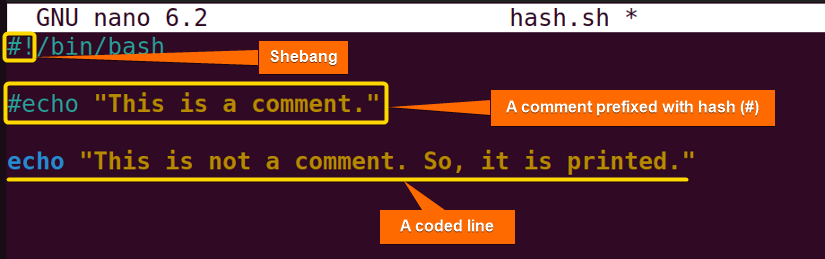
echo "This is not a comment. So, it is printed."Here, #! /bin/bash: ‘#!’, is called shebang. Now, #echo “This is a comment.” indicates a comment as the line starts with a hash symbol. Lastly, echo “This is not a comment. So, it is printed.” dictates a command that will be executed.
 ➍ Then, press CTRL+S to save the file & press CTRL+X to exit the nano editor & back to the terminal.
➎ Afterward, use the following command to make the script executable:
chmod u+x hash.sh- chmod: Changes the permission of the files and directories.
- u+x: It’s an argument that is used to add the executable permission for the user.
- hash.sh: The file which you want to make executable. Here, I have used a file named ‘hash.sh’.
 ➏ Finally, run the script by the following command:
./hash.sh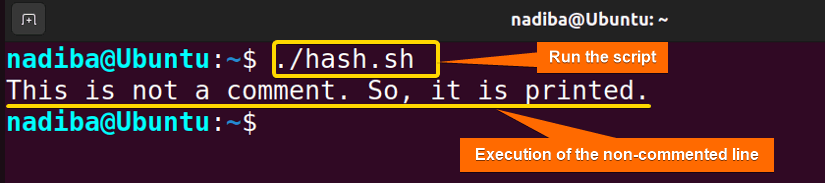 From the above image, you can see that when I ran the script ‘hash.sh’, it displayed only one line which was written inside the echo command & there was no hash symbol before this line on the script. On the contrary, the line that started with a hash symbol did not execute as it refers only to a statement.
Conclusion
Bash hashing is nothing but a commenting-out feature of a Bash script. Though this is not executable, it participates in making the script more readable and accessible.
People Also Ask
Related Articles
- The Art of Commenting in Bash
- What Are Single-line Comments in Bash? [2 Cases With Examples]
- Multiple Line Comments in Bash [With Shortcut Keys]
- How to Use Block Comment in Bash? [2 Cases]
<< Go Back to Bash Comments | Bash Scripting Tutorial
FUNDAMENTALS A Complete Guide for Beginners