Summary: in this tutorial, you will learn how to use the SQL Server DATEPART() function to extract a part of a date.
SQL Server DATEPART() function overview
The DATEPART() function returns an integer that is a part of a date such as a day, month, or year.
Here’s the syntax of the DATEPART() function:
DATEPART ( date_part , input_date )Code language: SQL (Structured Query Language) (sql)The DATEPART() takes two arguments:
date_partis the part of a date to be extracted. ( See the valid date parts in the table below).input_dateis the date from which the date part is extracted.
| date_part | abbreviations |
|---|---|
| year | yy, yyyy |
| quarter | qq, q |
| month | mm, m |
| dayofyear | dy, y |
| day | dd, d |
| week | wk, ww |
| weekday | dw |
| hour | hh |
| minute | mi, n |
| second | ss, s |
| millisecond | ms |
| microsecond | mcs |
| nanosecond | ns |
| TZoffset | tz |
| ISO_WEEK | isowk, isoww |
SQL Server DATEPART() examples
Let’s take some examples of using the DATEPART() function.
1) Using DATEPART() function with variables
This example uses the DATEPART() function to extract various parts of a date value stored in a variable:
DECLARE @d DATETIME = '2019-01-01 14:30:14';
SELECT
   DATEPART(year, @d) year,
   DATEPART(quarter, @d) quarter,
   DATEPART(month, @d) month,
   DATEPART(day, @d) day,
   DATEPART(hour, @d) hour,
   DATEPART(minute, @d) minute,
   DATEPART(second, @d) second;Code language: SQL (Structured Query Language) (sql)
Here is the output:

2) Using DATEPART() function with table columns example
We will use the sales.orders and sales.order_items from the sample database for demonstration.

The following example uses the DATEPART() function to query the gross sales by year, quarter, month, and day.
SELECT
  DATEPART(year, shipped_date) [year],
  DATEPART(quarter, shipped_date) [quarter],
  DATEPART(month, shipped_date) [month],
  DATEPART(day, shipped_date) [day],
  SUM(quantity * list_price) gross_sales
FROM
  sales.orders o
  INNER JOIN sales.order_items i ON i.order_id = o.order_id
WHERE
  shipped_date IS NOT NULL
GROUP BY
  DATEPART(year, shipped_date),
  DATEPART(quarter, shipped_date),
  DATEPART(month, shipped_date),
  DATEPART(day, shipped_date)
ORDER BY
  [year] DESC,
  [quarter],
  [month],
  [day];Code language: SQL (Structured Query Language) (sql)
Here is the partial output:
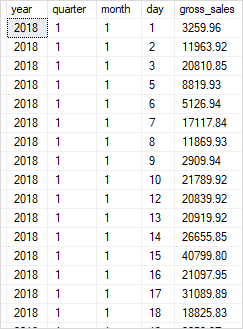
In this example, we used the DATEPART() function to extract year, quarter, month, and day from the values in the shipped_date column. In the GROUP BY clause, we aggregated the gross sales ( quantity * list_price) by these date parts.
Note that you can use the DATEPART() function in the SELECT, WHERE, HAVING, GROUP BY, and ORDER BY clauses.
Summary
- Use the SQL Server
DATEPART()to extract a date part from a date.

