Summary: in this tutorial, you will learn how to use the SQL Server JSON_ARRAY() function to create a JSON array string from zero or more values.
Introduction to the SQL Server JSON_ARRAY() function
The JSON_ARRAY() function creates a JSON array string from zero or more values.
Here’s the basic syntax of the JSON_ARRAY() function:
JSON_ARRAY(value1, value2, ..., [json_null_clause])Code language: SQL (Structured Query Language) (sql)In this syntax:
value1,value2, and so on are values in the result JSON array string.json_null_clausedetermines whether theJSON_ARRAY()function skips SQLNULLor converts it to a JSON null value.
The valid values for the json_null_clause are:
NULLONNULL: This option instructs theJSON_ARRAY()function to convert SQLNULLinto a JSONnullvalue.ABSENTONNULL: This option instructs theJSON_ARRAY()function to omit theNULLin the result array.
The json_null_clause is optional. It defaults to ABSENT ON NULL.
The JSON_ARRAY() function returns a valid JSON array string of NVARCHAR(MAX) type.
SQL Server JSON_ARRAY() function examples
Let’s take some examples of using the JSON_ARRAY() function.
1) Basic JSON_ARRAY() function examples
The following example uses the JSON_ARRAY() function to create an empty JSON array:
SELECT JSON_ARRAY() result;Code language: SQL (Structured Query Language) (sql)Output:
result
------
[]Code language: SQL (Structured Query Language) (sql)
The following example uses the JSON_ARRAY() function to create a JSON array that contains two elements:
SELECT
  JSON_ARRAY('John', '[email protected]') contact;Code language: SQL (Structured Query Language) (sql)
Output:
contact
-------------------------------
["John","[email protected]"]Code language: SQL (Structured Query Language) (sql)
2) Using JSON_ARRAY() function with json_null_clause option
The following example uses the JSON_ARRAY() function to create a JSON array from values including NULL:
SELECT JSON_ARRAY('John',NULL,'Jane') contacts;Code language: SQL (Structured Query Language) (sql)Output:
contacts
---------------
["John","Jane"]
(1 row)Code language: SQL (Structured Query Language) (sql)
In this example, the JSON_ARRAY() function skips the NULL. Therefore, the result JSON array contains only two elements.
To convert SQL NULL to a JSON null value, you use the NULL ON NULL option:
SELECT JSON_ARRAY('John',NULL,'Jane', NULL ON NULL) contacts;Code language: SQL (Structured Query Language) (sql)Output:
contacts
--------------------
["John",null,"Jane"]Code language: SQL (Structured Query Language) (sql)
3) Using JSON_ARRAY() function with table data
We’ll use the production.products table from the sample database:
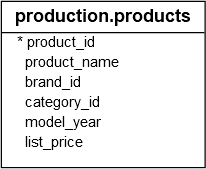
The following example uses the JSON_ARRAY() function to convert each row in the production.products table into a JSON array:
SELECT
  JSON_ARRAY(
    product_name, model_year, list_price
  ) product
FROM
  production.products;Code language: SQL (Structured Query Language) (sql)
Output:
product
-----------------------------------------------------------------------
["Trek 820 - 2016",2016,379.99]
["Ritchey Timberwolf Frameset - 2016",2016,749.99]
["Surly Wednesday Frameset - 2016",2016,999.99]
...Code language: SQL (Structured Query Language) (sql)
Summary
- Use the SQL Server
JSON_ARRAY()function to create a JSON array string from zero or more values.

