Summary: in this tutorial, you will learn how to use the SQL Server JSON_OBJECT() function to create a string that contains a JSON object from a list of key/value pairs.
Introduction to the SQL Server JSON_OBJECT() function
The JSON_OBJECT() creates a JSON object string from a list of key/value pairs.
Here’s the basic syntax of the JSON_OBJECT() function:
JSON_OBJECT(key1:value1 [json_null_clause], key2:value2 [json_null_clause], ...)Code language: SQL (Structured Query Language) (sql)In this syntax:
key1:value1,key2:value2… are key values of the result JSON object.json_null_clauseoption determines how theJSON_OBJECTfunction works when thevalue1,value2, and so on isNULL.
The json_Null_clause accepts NULL ON NULL or ABSENT ON NULL:
NULL ON NULL: TheJSfunction convertsON_OBECT()NULLin SQL into a JSONnullvalue when generating the JSON value.ABSENT ON NULL:THeJSfunction omits the entire key if the value isON_OBJECT()NULL.
By default, the json_Null_clause is NULL on NULL.
The JSON_OBJECT() function returns a valid JSON object with the type NVARCHAR(MAX).
SQL Server JSON_OBJECT() function examples
Let’s take some examples of using the JSON_OBJECT() function.
1) Basic JSON_OBJECT() function examples
The following example uses the JSON_OBJECT() function to create an empty JSON object:
SELECT JSON_OBJECT() result;Code language: SQL (Structured Query Language) (sql)Output:
result
------
{}Code language: SQL (Structured Query Language) (sql)
The following example uses the JSON_OBJECT() function to create a JSON object with three key/value pairs:
SELECT
  JSON_OBJECT(
    'name' : 'John', 'age' : 22, 'job' : 'DBA'
  ) employee;Code language: SQL (Structured Query Language) (sql)
Output:
employee
------------------------------------
{"name":"John","age":22,"job":"DBA"}Code language: SQL (Structured Query Language) (sql)
2) Using the JSON_OBJECT() function with NULL
The following example uses the JSON_OBJECT() function to create an object from values that contain NULL:
SELECT
  JSON_OBJECT(
    'name' : 'John', 'age' : 22, 'job' : NULL
  ) employee;Code language: SQL (Structured Query Language) (sql)
Output:
employee
-----------------------------------
{"name":"John","age":22,"job":null}Code language: SQL (Structured Query Language) (sql)
In this example, the value of the job key is NULL. Therefore, the JS function converts it into a JSON ON_OBJECT()null value.
To omit the key/value where the value is NULL, you can explicitly use the ABSENT ON NULL option:
SELECT
  JSON_OBJECT(
    'name' : 'John', 'age' : 22, 'job' : NULL ABSENT ON NULL
  ) employee;Code language: SQL (Structured Query Language) (sql)
Output:
employee
------------------------
{"name":"John","age":22}Code language: SQL (Structured Query Language) (sql)
4) Using the JSON_OBJECT() function to create a complex JSON object
The following example uses the JSON_OBJECT() function that creates a JSON object nested in another JSON object:
SELECT
  JSON_OBJECT(
    'name' : 'John',
    'job' : JSON_OBJECT('title' : 'DBA', 'grade' : 'P3')
  ) employee;Code language: SQL (Structured Query Language) (sql)
Output:
employee
--------------------------------------------------
{"name":"John","job":{"title":"DBA","grade":"P3"}}Code language: SQL (Structured Query Language) (sql)
5) Using the JSON_OBJECT() function with JSON_ARRAY() function
The following example constructs a JSON object with three keys, one key contains a JSON string, another key contains a JSON object, and another key contains a JSON array:
SELECT
  JSON_OBJECT(
    'name' : 'John',
    'job' : JSON_OBJECT('title' : 'DBA', 'grade' : 'P3'),
    'skills' : JSON_ARRAY(
      'SQL', 'Linux', 'Backup & recovery'
    )
  ) employee;Code language: SQL (Structured Query Language) (sql)
Output:
employee
-----------------------------------------------------------------------------------------------
{"name":"John","job":{"title":"DBA","grade":"P3"},"skills":["SQL","Linux","Backup & recovery"]}Code language: SQL (Structured Query Language) (sql)
In this example, we use the JSON_ARRAY() function to construct a JSON array from values.
6) Using the JSON_OBJECT() function with table data
We’ll use the production.products table from the sample database.
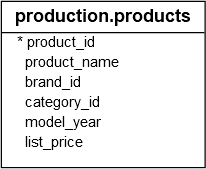
The following example uses the JSON_OBJECT() function to create a JSON object for each row in the production.products table:
SELECT
  JSON_OBJECT(
    'product_id' : product_id, 'product_name' : product_name,
    'model_year' : model_year, 'list_price' : list_price
  ) product
FROM
  production.products;Code language: SQL (Structured Query Language) (sql)
Output:
product
----------------------------------------------------------------------------------------------------------
{"product_id":1,"product_name":"Trek 820 - 2016","model_year":2016,"list_price":379.99}
{"product_id":2,"product_name":"Ritchey Timberwolf Frameset - 2016","model_year":2016,"list_price":749.99}
{"product_id":3,"product_name":"Surly Wednesday Frameset - 2016","model_year":2016,"list_price":999.99}
...Code language: SQL (Structured Query Language) (sql)
Summary
- Use the
JSON_OBJECT()function to construct a JSON object string from a list of key/value pairs.

